The dental front office is the clinic's revenue-control hub, where every unanswered call and unverified benefit can translate directly into lost production. No-show rates have been reported from 13.5% to 48%, with an estimated average of 23% across studies, so front-office systems must protect both patient access and chair utilization (systematic review of dental appointment no-shows).
A busy morning makes the problem obvious. One patient is checking in, another is calling about an insurance estimate, a hygienist needs a chart updated, and the phone keeps ringing. If the team treats reception as a collection of disconnected errands, calls go unanswered, benefits remain unclear, cancellations create empty chairs, and patients leave with financial questions instead of a clear next step. A well-run dental front office works differently. It manages intake, scheduling, communication, insurance, documentation, and payment as one operating system.
This guide explains how to build that system, when in-house staffing makes sense, where virtual medical assistants can extend coverage, and how to protect patient information while remote staff work inside practice workflows. The objective isn't to make the front desk busier. It's to give every task a defined owner, a reliable handoff, and a measurable effect on access, production, and staff workload.
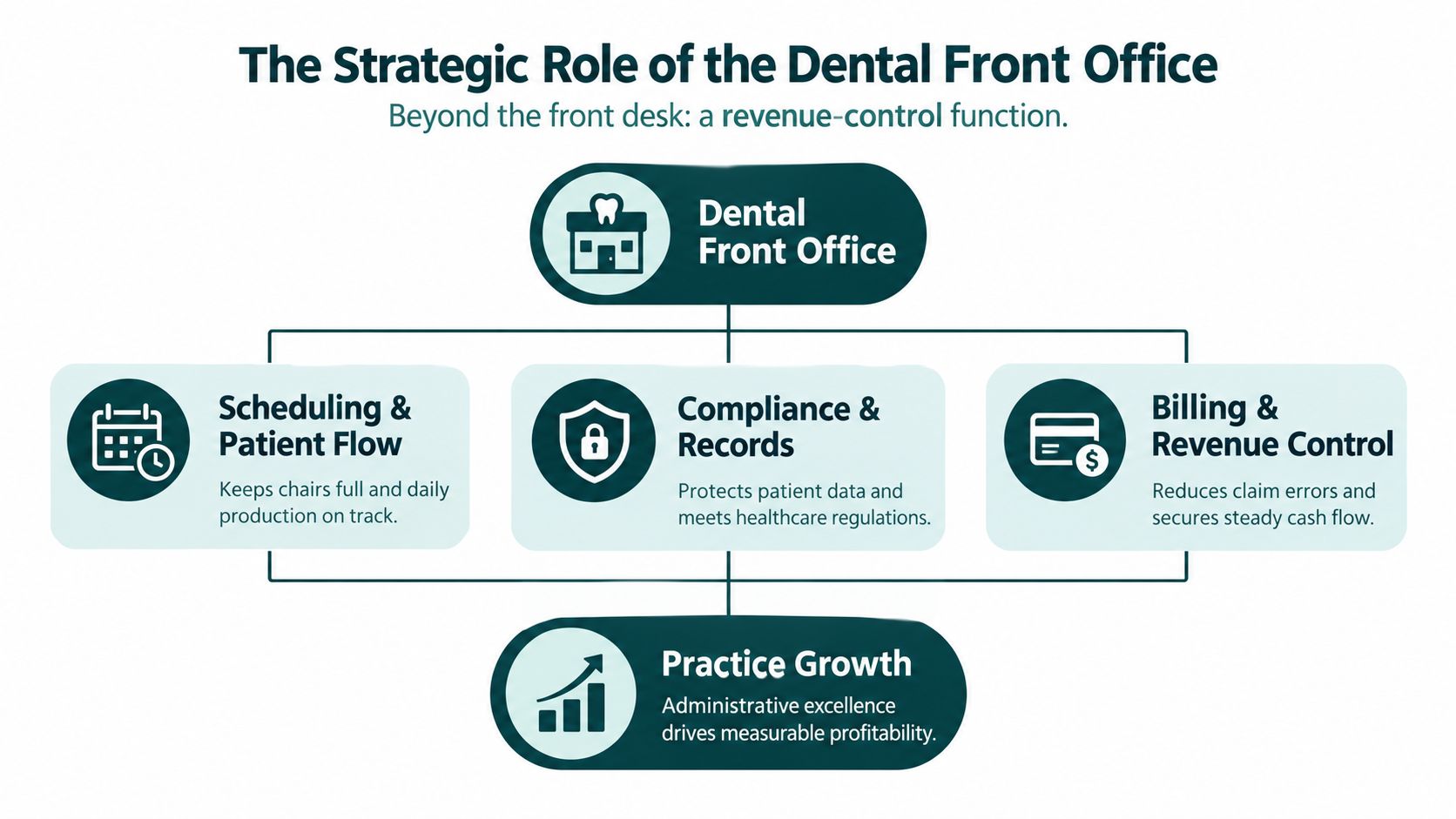
The Strategic Role of the Dental Front Office
The dental front office controls the patient journey before treatment starts and after the patient leaves. A scheduler determines whether a new caller reaches a provider's calendar. An insurance specialist determines whether the patient understands expected responsibility before treatment. A checkout coordinator determines whether the next appointment is secured and whether the financial conversation ends clearly.
Those actions directly affect revenue control. A missed call can mean a lost new-patient opportunity, an unrecovered cancellation, or a question that never reaches the right team member. An incomplete benefit check can lead to a surprise balance, a disputed estimate, or a claim problem later. The front desk doesn't produce the clinical service, but it determines whether the practice has the information, attendance, and financial coordination needed to deliver it efficiently.
From reception to revenue control
Start by assigning ownership to the moments that influence production:
- First contact: Answer or return calls promptly, identify the caller's need, and move appropriate new-patient conversations toward an appointment.
- Pre-visit preparation: Collect forms, confirm demographics, request records, and verify benefits before the patient arrives.
- Schedule protection: Confirm upcoming visits, manage the waitlist, and offer open times to patients who can come in sooner.
- Checkout and follow-up: Schedule the next visit, explain the balance, document unresolved questions, and route clinical matters to licensed staff.
This structure also clarifies performance conversations. Instead of telling a receptionist to “be more organized,” a manager can ask whether same-day call returns are assigned, whether incomplete insurance checks appear on a work queue, and whether cancellations are offered to a defined waitlist. Specific ownership produces better coaching than general criticism.
Practical rule: If a front-office task can change whether a patient books, attends, accepts a financial plan, or pays correctly, manage it as an operational control, not an informal favor.
The model applies across specialties, but the emphasis changes. General dentistry often needs tight recall and hygiene scheduling. Orthodontic offices manage longer treatment relationships, recurring visits, and benefit limitations that can affect estimates over time. Pediatric practices need communication that works for both the child's caregiver and the clinical team. In each case, the front office should be designed around the patient journey, not just around who happens to be available at the desk.
For practices considering extended coverage, a dental and orthodontic practice support model can include reception, scheduling, reminders, intake, and administrative follow-up. The right arrangement depends on the practice's call pattern, software, hours, and privacy controls. Remote support can extend capacity, but it doesn't remove the need for clear escalation rules or accountable on-site leadership.
Core Front-Office Workflows Explained
A reliable dental front office depends on repeatable workflows. Staff shouldn't have to reconstruct the process every time a new patient calls, a cancellation appears, or an insurer gives an unclear answer. The following four workflows form the operational backbone.
Patient intake and first contact
The first call should produce more than a name and phone number. The team needs to identify the reason for the visit, preferred timing, relevant history the practice requires, referral information when applicable, and the next action. The staff member should also distinguish administrative questions from symptoms or urgent concerns that require clinical triage.
Call handling has two separate controls: answer rate and conversion quality. One analysis reports that practices answer about 75% to 80% of calls, while missed-call-focused reports place unanswered inbound calls at roughly 20% to 25%. Some top-performing clinics exceed 90% answer rates, and some benchmarks indicate that only about half of answered new-patient calls become scheduled appointments (dental call-handling benchmarks). The practical lesson is simple. A person or system must answer, but answering alone isn't enough. Staff need a consistent discovery and booking script.
Insurance verification and financial clarity
Eligibility verification should happen early enough for the practice to interpret benefits and communicate likely patient responsibility before treatment. The American Dental Association's eligibility verification guidance explains that verification on the date of service helps avoid future recoupment requests and commonly involves payer portals or the number on the patient ID card.
A complete workflow records the payer, member and group information, subscriber details, eligibility status, deductibles, frequency limits, annual maximum information, and procedure-specific restrictions when available. Verification isn't a promise of payment. It gives the practice a documented basis for an estimate and a reason to explain uncertainty when a payer's response is incomplete or benefits may change.
Current coverage identifies real-time insurance verification as a major daily operational challenge for dental practices, with 71% naming it their primary challenge in the cited 2026 coverage (dental insurance verification operations). That finding reinforces why verification deserves a queue, quality checks, and escalation path rather than being left to whoever has a spare moment.
Scheduling, confirmations, and recovery
Scheduling is a production-control process. The scheduler balances provider availability, procedure length, patient preferences, emergency access, and the likelihood that an opening can be filled. A cancellation list is only useful when it contains current preferences and when someone actively contacts appropriate patients.
Reminder design should match patient risk and preference. A randomized study of 13,505 outpatient appointments found no-show rates of 13.6% with a clinic staff reminder, 17.3% with an automated reminder, and 23.1% with no reminder (randomized reminder study00108-7/fulltext)). A private orthodontic study covering 1,193 appointments reported an average no-show rate of 2.43%, with phone calls at 3.49%, email at 2.68%, and SMS at 1.90%, although the differences weren't statistically significant (orthodontic appointment reminder study). Use automation for consistency, but reserve live outreach for high-risk visits, complex appointments, and schedule-recovery opportunities.
Tools can help with overflow and documentation. For example, practices evaluating automated call coverage can review Officehand AI Receptionist features alongside their requirements for escalation, scheduling access, call notes, and human follow-up. Technology should support the workflow, not create a second inbox that staff forget to monitor.
Checkout, claims, and follow-up
The appointment doesn't end when the patient leaves the chair. Checkout staff should confirm the next visit, collect according to the practice's financial policy, document unresolved questions, and route clinical explanations to the appropriate provider or team member. Billing support then works from accurate demographics, insurance data, procedure details, and documentation.
Practices can assign these tasks to one person or split them across roles. The choice matters less than the handoff. A claim queue should show what is missing, who owns the next step, and when follow-up is due. Without that visibility, front-office errors become delayed claims, patient calls, and avoidable rework.
For practices that need a dedicated process, insurance verification services can be evaluated as an extension of the existing team. Before assigning access, define which benefits must be checked, how findings are documented, what requires same-day rechecking, and who approves patient estimates.
Staffing Models and Virtual Support
The staffing decision should begin with workload, not ideology. An on-site employee may be essential for greeting patients, collecting documents, managing walk-ins, and coordinating with clinical staff in real time. A remote assistant may be more useful for call overflow, pre-visit verification, recall, confirmation campaigns, billing follow-up, or work that accumulates after the reception area becomes busy.
A hybrid structure often separates in-person presence from administrative throughput. The person at the desk handles immediate patient-facing needs. A remote team member works a defined queue and protects the tasks that otherwise get postponed. A fully remote model can work for practices with strong digital intake and limited walk-in traffic, but it requires dependable phone, scheduling, documentation, escalation, and privacy processes.
Staffing Model Comparison
| Feature | In-House Front Desk | Virtual Medical Assistant |
|---|---|---|
| Patient greeting | Directly manages arrivals, forms, payments, and face-to-face concerns | Doesn't replace the physical reception function |
| Phone coverage | Strong during staffed hours, vulnerable when the employee is helping a patient or away from the desk | Can focus on calls and callbacks during agreed clinic hours |
| Insurance work | Convenient when the team is already familiar with local workflows | Useful for dedicated eligibility and benefits queues |
| Schedule recovery | Can coordinate immediately with the clinical team | Can work waitlists, confirmations, and cancellation follow-up without standing at reception |
| Training | Practice controls onboarding, coaching, and daily supervision | Requires structured onboarding, access controls, documentation standards, and quality review |
| Privacy | Easier to observe the physical work environment, but local mistakes still create risk | Requires careful vendor review, written agreements, secure systems, and limited access |
| Best fit | High walk-in volume and constant in-person coordination | Repetitive administrative work, overflow coverage, and defined remote queues |
| Main trade-off | Higher fixed staffing commitment and coverage gaps during interruptions | Less physical presence and more dependence on process design and communication |
How to choose the model
Map the work for several ordinary days before deciding. Count unanswered calls, unworked voicemails, incomplete benefit checks, unconfirmed appointments, unresolved patient messages, and claims or balances waiting for follow-up. The point isn't to create a complicated dashboard. It's to identify work that is both repetitive and financially consequential.
A remote role should have a narrow initial scope. For example, an assistant might begin with confirmations, recall calls, and insurance verification, while the on-site team retains check-in, checkout, and clinical escalation. Once the handoffs are stable, the practice can add billing support or prior-authorization coordination.
Remote access also creates obligations. A person who can view protected health information isn't merely helping with scheduling. The practice must decide what systems the person may use, what information is necessary, how incidents are reported, and how supervisors review work. HIPAA requirements and state obligations can vary, so confirm the arrangement with qualified compliance or legal counsel.
Real-World Front-Office Scenarios
A dental front office proves its value during interruptions, not during quiet periods. The following scenarios are illustrative, but the operational patterns are common.
The unanswered new-patient call
The receptionist is checking in a child when a prospective patient calls. The caller reaches voicemail and doesn't leave a message. A practical recovery process assigns the missed call to a same-day callback queue, records the source and reason for calling when known, and gives the caller a clear path to schedule.
The callback shouldn't begin with a generic apology. Staff can confirm whether the caller is seeking an exam, an emergency visit, a specialty consultation, or information about an existing appointment. That short discovery step determines the correct appointment type and reduces the risk of placing a patient into an unsuitable slot.
The cancellation that opens a productive slot
A patient cancels a long appointment the day before treatment. The scheduler checks the waitlist for patients who requested that provider, procedure, and timing, then contacts the best matches in an orderly sequence. If no one accepts, the team can offer a shorter appointment, move another visit, or use the time for an appropriate administrative or clinical planning task.
The workflow works because the list is maintained before the cancellation occurs. A spreadsheet with outdated preferences isn't a recovery system. Each entry should show contact permission, preferred days, appointment needs, and the last outreach result.
In the cited 2024 dental scheduling report, average no-show rates declined from 7% in 2022 to 4% in 2023, while the top 10% of practices held no-shows to 1% (dental scheduling and retention report). The operational implication is that confirmation discipline and same-day schedule recovery deserve management attention because even a modest reduction in missed visits can improve access and chair use.
The complicated benefits question
A patient calls before restorative treatment and asks why the estimate doesn't match a previous explanation. The front-office specialist shouldn't improvise. They should review the documented verification, identify whether the issue involves frequency, waiting periods, remaining benefits, coordination of benefits, or a procedure-level restriction, and explain what is known and what remains subject to payer processing.
If the payer information is ambiguous, the staff member documents the call, escalates the interpretation according to practice policy, and avoids presenting an estimate as a guarantee. That approach protects the patient relationship and reduces the chance that an uncertain answer becomes a later dispute.
The frustrated caller
A patient says the office promised an appointment time that isn't on the schedule. The team checks the appointment record and any permitted call documentation, listens without arguing, and offers the available options. The goal is not to prove the patient wrong. It's to establish what happened, resolve the immediate scheduling issue, and document the outcome so the next staff member doesn't restart the conversation.
Building a Compliant and Efficient Team
Efficiency starts with role design. A virtual medical receptionist can manage calls and scheduling, an appointment coordinator can own confirmations and recall, an insurance verification specialist can work benefits, and billing support can handle claims or payer follow-up. Don't give one person every queue without deciding which work takes priority when the phone rings.
Hire for workflow judgment
Experience with dental terminology and practice-management software matters, but judgment matters just as much. Candidates should demonstrate that they can distinguish a scheduling request from a clinical concern, document a payer response without overstating it, protect privacy during a phone conversation, and escalate an issue instead of guessing.
A useful evaluation includes:
- Communication: Role-play a new-patient call, a cancellation, and a balance question.
- Systems ability: Test navigation of the practice-management system or a comparable training environment.
- Accuracy: Provide a sample eligibility response and ask the candidate to identify what can and can't be told to the patient.
- Documentation: Review a sample phone note for clarity, completeness, and appropriate escalation.
- Reliability: Confirm availability during the practice's working hours and ability to follow a defined queue.
Training should continue after onboarding. Use call reviews, payer examples, schedule audits, and short refreshers when a workflow changes. Managers should coach the behavior that affects the assigned role, rather than measuring every employee against the same standard.

Protect PHI before access begins
HIPAA isn't a badge or a marketing label. It is a set of requirements that apply to covered entities and their arrangements with business associates. The ADA's HIPAA guidance for dental practices states that dentists need a compliant written business associate agreement with each business associate. The agreement must describe permitted and required uses and disclosures of protected health information, prohibit unauthorized use or disclosure, and require the associate to follow relevant Privacy Rule obligations while performing covered work.
That means a remote staffing arrangement should be approved before the assistant receives access. Define the systems, role permissions, minimum necessary information, secure communication methods, incident reporting process, termination procedure, and supervisor responsible for review. A BAA supports compliance, but it doesn't replace access controls, workforce training, vendor oversight, or documented procedures.
Managers who want a broader operational refresher can review HIPAA compliance for clinicians, then confirm the practice's specific obligations with a qualified compliance professional. Avoid claims that any staff member or service is “HIPAA certified.” HHS doesn't recognize an official HIPAA certification.
Build a controlled remote workflow
Use separate accounts where possible, require approved devices and communication channels, and give each role only the access needed for its queue. A remote assistant shouldn't need unrestricted access to every chart, billing function, or clinical module because the practice-management system makes that convenient.
Document the handoff rules:
- Receive: The assistant accepts the call, task, or work item.
- Record: The assistant documents the action in the approved system.
- Escalate: Clinical, privacy, legal, or uncertain insurance matters go to the designated practice contact.
- Close: The assistant records the resolution, pending action, and owner.
- Review: A manager samples work for accuracy and timeliness.
Credentialing and access administration should remain separate from clinical decision-making. Practices can also use medical credentialing support when administrative records, provider information, or payer-related coordination require a defined owner, while keeping licensed clinical responsibilities with the appropriate professionals.
The Takeaway
The dental front office isn't just the place where patients check in. It controls first contact, appointment access, benefit clarity, schedule recovery, payment communication, and the handoffs that determine whether clinical capacity turns into completed care. Treating those responsibilities as a revenue-control function gives owners and managers a better way to find leakage and assign accountability.
Begin with a workflow audit. Review missed calls, callback ownership, incomplete verification, confirmation outcomes, cancellations, waitlist activity, and checkout documentation. Then choose the staffing model that matches the work. Keep patient-facing tasks on site when physical coordination demands it, and consider a defined remote queue for calls, reminders, verification, recall, or billing follow-up when those tasks are being delayed.
The strongest operation isn't the one with the most technology or the largest front desk. It's the one where staff know what to do, systems record what happened, exceptions reach the right person, and managers review the controls that protect patient access and production. A disciplined dental front office makes the entire practice easier to run.
Medical Virtual Assistants connects U.S. dental practices with pre-vetted LATAM professionals for receptionist, scheduling, patient intake, insurance verification, billing, and related administrative workflows during U.S. clinic hours. If your team needs defined front-office coverage without handing remote staff unstructured access, visit Medical Virtual Assistants to review the available staffing approach.