Staff shortages affect 89% of dentists, while average dental schedules are only about 85% full, so the central dentistry practice management problem is capacity design, not hiring more people. A practice can have strong clinical demand and still lose production when front-desk coverage, appointment reliability, recall work, and billing follow-up don't operate as one system.
You may recognize the pattern. The schedule looks busy, but cancellations leave holes that nobody fills. The front desk answers calls while trying to verify insurance. Claims wait until the end of the day because the same person is handling check-in, patient questions, and payment posting. The practice then responds by opening another position, even though the underlying issue may be poorly distributed administrative work.
Effective management connects staffing coverage, chair utilization, patient communication, and revenue-cycle discipline. This guide explains how to identify the hidden capacity constraint, build a more dependable patient-flow system, compare in-house and remote support, reduce preventable billing rework, and protect patient information when administrative work happens outside the practice.
Understanding the Current Practice Management Challenge
A dental practice doesn't lose capacity only when a chair sits empty. It also loses capacity when no one answers a new-patient call, when a recall patient isn't contacted, when an insurance issue delays treatment, or when a provider's schedule contains appointments that were never properly confirmed. These failures often look unrelated because different employees handle them. Operationally, they belong to the same capacity problem.
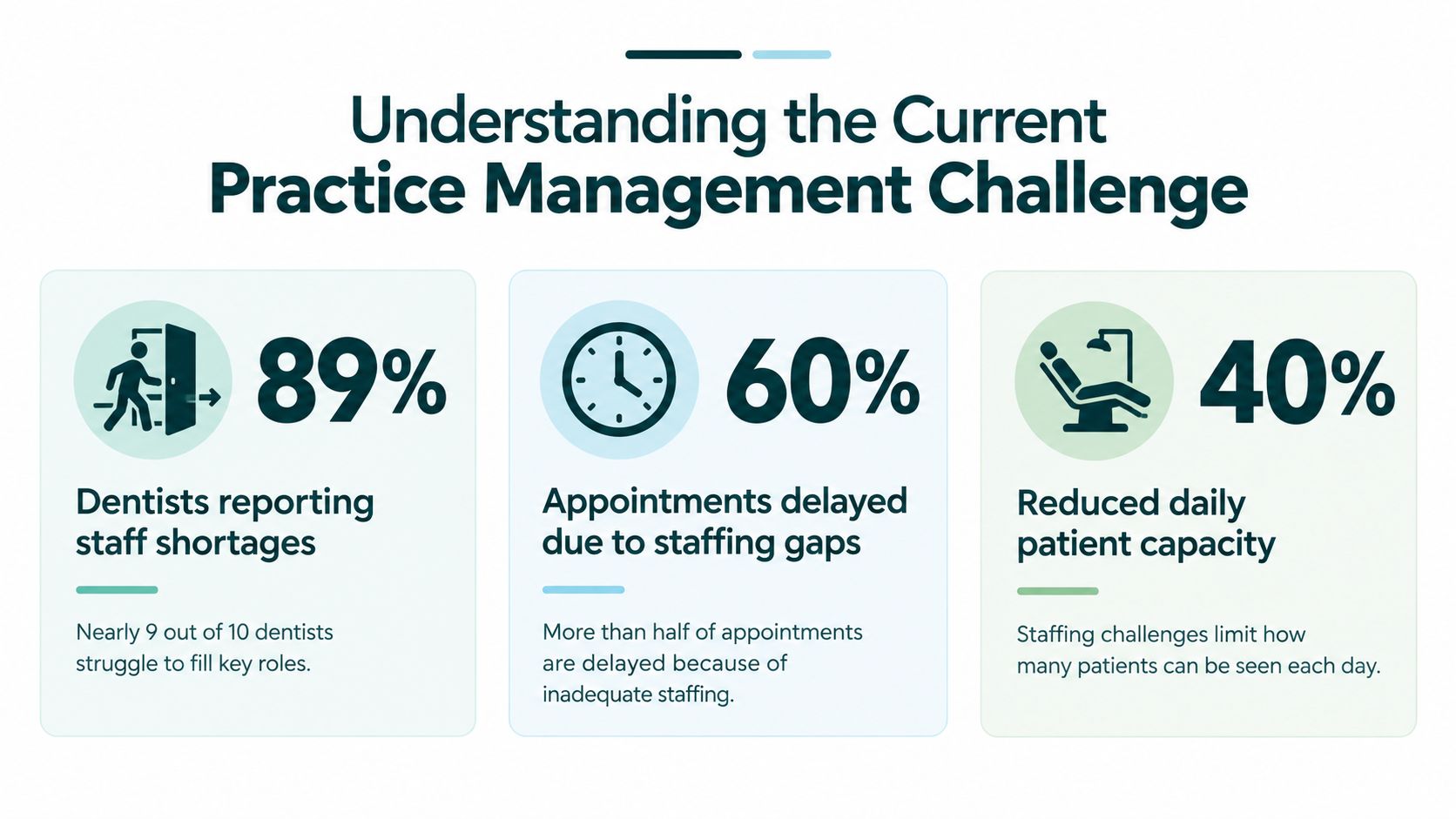
The 2025 Dental Economics and Levin Group practice survey reported that more than 89% of responding dentists believed dental staff were in short supply, 58% were seeking at least one team member, and 76% had an open position. Those figures describe a labor problem, but they also describe a coverage problem. A practice can recruit continuously and still struggle if the available hours don't match the work that must be completed.
Staffing gaps create a chain reaction
The American Dental Association's January 2023 economic outlook found that approximately two out of three dentists identified staffing as a major challenge for the following six months. The same report placed the average schedule at approximately 85% full in January 2023. The combination matters. Recruitment difficulty can restrict appointment availability even when patient demand exists, while an underfilled schedule leaves less room to absorb rising operating costs.
Owners often respond by asking whether they need another receptionist, scheduler, or biller. The more useful question is, which tasks are preventing the practice from using the capacity it already has? If the answer is unanswered calls during clinic hours, the solution differs from a backlog of eligibility checks. If the problem is repeated cancellations, adding a billing employee won't repair the schedule.
Practice ownership has also become more varied. The ADA's dental practice research shows that private-practice ownership among U.S. dentists declined from 84.7% in 2005 to 72.5% in 2023, while 16% of U.S. dentists were affiliated with a dental support organization in 2024. The United States had approximately 135,665 dental-practice establishments, which means management systems must work for solo offices, multi-location groups, and DSO-affiliated practices alike.
Practical rule: Don't measure staffing only by headcount. Measure whether every critical workflow has an owner, a backup, and defined coverage during the hours when patients and payers are most active.
Start with a capacity map
List the work that affects completed appointments and collected revenue. Include inbound calls, appointment booking, confirmation, cancellation recovery, recall outreach, insurance verification, claim submission, denial follow-up, payment posting, and patient financial conversations. Then record when each task happens, who performs it, and what happens when that person is unavailable.
A capacity map usually exposes a mismatch. A practice may have enough total labor hours but too little coverage between the first morning appointment and the final phone call. Another may have a full-time employee spending prime clinic hours on work that could be completed in a quieter administrative block. The fix may be redistribution, cross-training, or dedicated remote support rather than immediate expansion of the entire team.
Owners evaluating dental and orthodontic workflows can also review support options for dental and orthodontic practices when the gap involves recurring administrative work rather than clinical duties. The role must remain clearly defined. Administrative support can coordinate information and follow established procedures, but it shouldn't diagnose patients, make treatment decisions, or perform licensed work.
Designing Reliable Patient-Flow Workflows
Appointment reliability improves when confirmation is treated as a controlled workflow rather than a message sent whenever the front desk has spare time. The process should identify risk, create several opportunities for the patient to respond, and give staff enough notice to refill released chair time.
A study of 1,604,184 appointments across 64 dental practices found that automated reminders reduced no-shows by 22.95% compared with manual reminder processes. It reported no-show rates of 1.9% for SMS, 2.68% for email, and 3.49% for telephone reminders in that dataset, as described in the dental appointment no-show benchmark analysis. Those figures are useful benchmarks, not promises. Your practice should judge channels by completed appointments, patient preferences, consent, and the quality of follow-up after a nonresponse.

Build confirmation around risk
A dependable workflow uses a confirmation request several days before the appointment, a reminder one day before, and an escalation queue for patients who haven't responded. The queue matters more than the first message. Without an assigned person checking unconfirmed appointments, automation creates a list of silent risks.
Segment the queue by appointment type and patient history. A long restorative visit or an appointment requiring preparation deserves earlier attention than a short routine visit. Patients with previous missed appointments, unconfirmed visits, or a long interval between booking and the appointment should receive direct outreach. A systematic review of dental no-show prediction studies found reported no-show rates ranging from 13.5% to 48%, with recurring predictors that included failure to confirm by SMS, previous missed appointments, Monday appointments, first-week-of-the-month appointments, and long booking lead times. The review is available through this analysis of dental no-show prediction studies.
A practical queue can contain these fields:
- Confirmation status: Recorded as confirmed, requested, unreachable, cancellation requested, or rescheduling needed.
- Risk reason: Previous no-show, long lead time, high chair-time requirement, or no response.
- Recovery action: Direct call, SMS follow-up, waitlist offer, or provider review.
- Ownership: One named staff member responsible for closing the next step.
- Outcome: Kept appointment, rescheduled appointment, backfilled opening, or unused time.
Recover released chair time
Cancellation recovery should begin when a patient cancels, not after hours. The staff member should document the opening, identify patients who can accept that appointment type, and contact the waitlist in an agreed order. A waitlist that exists only in a spreadsheet won't reliably protect production. Someone must work it.
Separate a cancellation from a true no-show. A cancellation may create time to backfill, while a no-show requires a different follow-up and may indicate a recurring risk pattern. Track both by provider, appointment type, lead time, and communication method. The study of 1,193 appointments in this reminder-method comparison reported an average no-show rate of 2.43%, with the no-reminder group experiencing more than three times as many no-shows as reminder groups. Its channel differences were not statistically significant, which reinforces the operational lesson: consistency matters, and your own completed-appointment data should guide channel selection.
Review practical patient experience tips alongside the scheduling workflow. A technically efficient reminder process can still frustrate patients if messages are unclear, difficult to answer, or disconnected from what happens when someone needs to reschedule.
Choosing Between In-House and Remote Support Models
The right staffing model depends on the work, its timing, and the level of judgment it requires. In-house employees offer proximity to providers and immediate access to office context. Remote staff can provide focused coverage for repeatable administrative work without requiring another workstation inside the clinic. Neither model fixes an unclear process.
A useful comparison starts with the task rather than the employment label. A receptionist answering phones during clinic hours needs strong communication, scheduling discipline, and reliable access to the practice-management system. An insurance verification specialist needs payer-portal proficiency, careful documentation, and a process for escalating ambiguous benefits. A billing support role needs claim accuracy, denial categorization, and disciplined follow-up. These requirements can be met in different ways, but they shouldn't be blurred into one general assistant role.
Compare coverage, control, and complexity
| Decision factor | In-house support | Remote support |
|---|---|---|
| Clinic presence | Useful when tasks require physical documents, room coordination, or face-to-face financial conversations | Suitable for calls, verification, recall, billing, records coordination, and other system-based work |
| Coverage pattern | Works well when workload is steady throughout the employee's shift | Works well when a practice needs dedicated coverage during clinic hours or focused work blocks |
| Supervision | Informal questions can be resolved quickly on site | Requires scheduled check-ins, written escalation rules, and documented performance review |
| Technology | May use local devices and office resources | Requires secure remote access, role-based permissions, and reliable connectivity |
| Bilingual communication | Depends on the local labor pool | Can broaden access to English-Spanish administrative support when patient demographics call for it |
| Scaling | Adding capacity may require another full role | A practice can assign a defined workflow without placing every task into one generalist position |
A small practice may keep patient-facing check-in and complex financial conversations in-house while assigning recall, eligibility checks, or claim follow-up to remote support. A multi-site group may centralize insurance verification and denial work, then leave local teams responsible for same-day patient questions. An orthodontic office may prioritize appointment coordination and records requests, while a general dental office may need more help with hygiene recall and payer follow-up.
Match the model to the work
Use in-house coverage when the role depends on physical presence, frequent hallway coordination, or immediate access to clinical staff. Use remote support when the work is repetitive, measurable, and performed inside a cloud practice-management system, phone platform, payer portal, or secure document workflow.
Don't outsource ambiguity. If staff members disagree about who owns a cancellation, how to document an eligibility result, or when to escalate a denied claim, remote placement will magnify the confusion. Write the workflow first, then assign it. The process should specify the input, the action, the documentation standard, the exception, and the person who makes the final decision.
A role matrix can keep boundaries clear:
- Virtual medical receptionist: Calls, appointment requests, confirmations, recall outreach, and message routing.
- Patient intake coordinator: Forms, records requests, demographic updates, and new-patient onboarding.
- Insurance verification specialist: Eligibility and benefit checks before treatment, with unclear results escalated.
- Medical billing support: Charge entry, claim submission, denial work, payment follow-up, and statements.
- Prior-authorization support: Submission tracking and escalation under established practice procedures.
- Medical administrative assistant: Records coordination, referrals, reporting, and other defined nonclinical work.
Review available administrative support roles against your capacity map, but keep clinical judgment with licensed professionals. Remote support can organize information and execute approved workflows. It shouldn't independently interpret clinical findings or promise coverage when payer information is uncertain.
Optimizing Revenue Cycle Operations
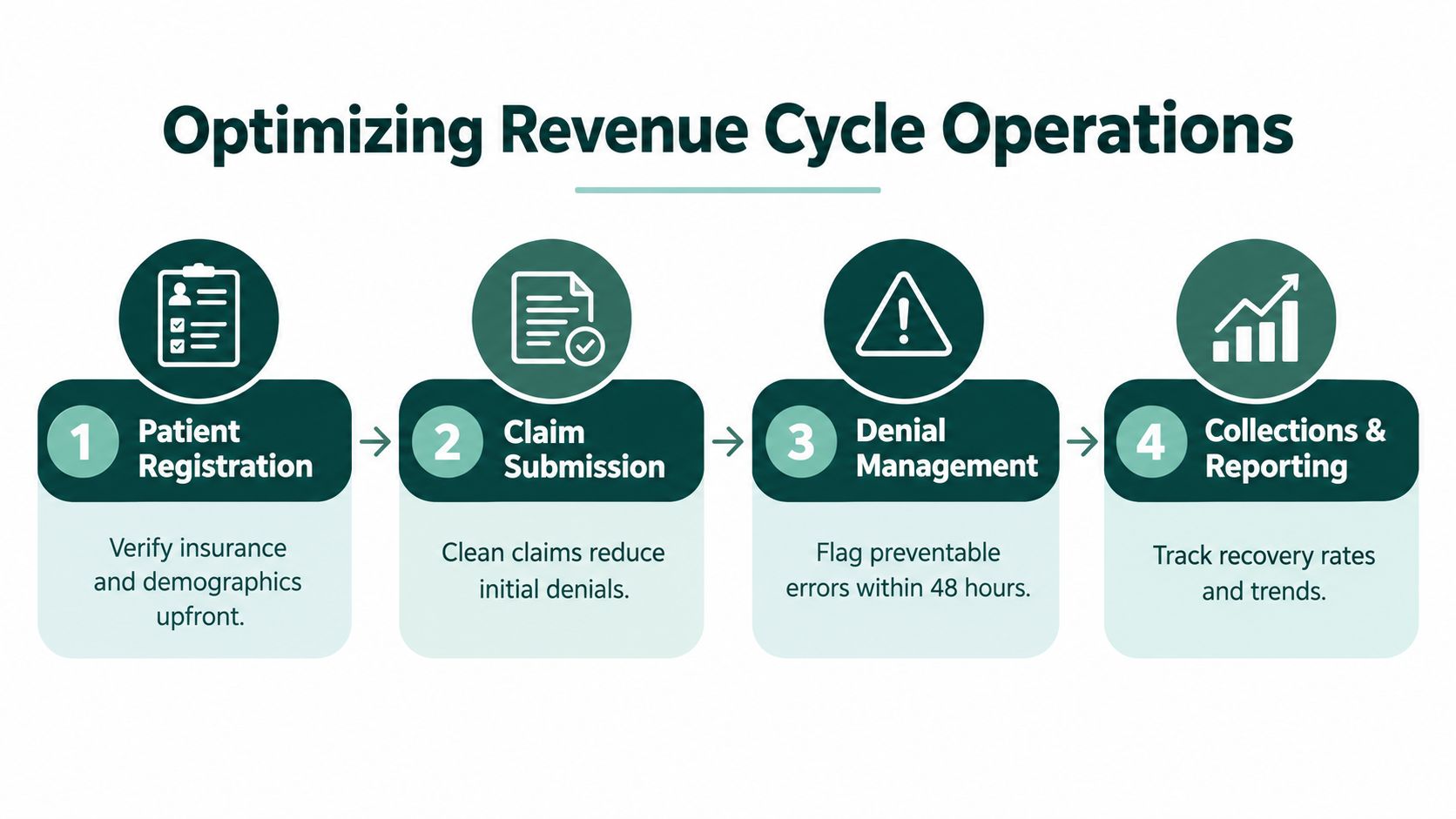
Revenue-cycle problems often begin before a claim is submitted. An outdated eligibility record, mismatched subscriber detail, missing attachment, or inconsistent procedure and diagnosis information can create work that appears later as a denial. By then, staff must correct the original defect while also monitoring filing limits, patient balances, and payer responses.
Published revenue-cycle literature places typical denial rates at approximately 5% to 10%, as discussed in this review of denial management and revenue-cycle performance. The useful management objective isn't just reaching a benchmark. It's identifying repeatable upstream defects and shortening the time between denial, correction, and resolution.
Verify before treatment
Eligibility verification should happen early enough for staff to resolve discrepancies before the patient arrives. Confirm the patient's identity, subscriber information, coverage status, network details, benefit limitations, and documentation requirements according to the practice's workflow. When the result is unclear, assign a human review rather than allowing an automated response to become an unexamined assumption.
The verification record should show the date checked, source used, staff member, relevant benefit details, and unresolved questions. This protects the front desk from repeating the same research and gives billing staff a clear reference when the claim is prepared. It also supports a more honest financial conversation with the patient. Verification isn't a guarantee of payment, so staff should distinguish confirmed information from estimates and explain that payer adjudication can differ.
Turn denials into categorized work
Create denial categories that describe the root cause, not just the payer's final message. Useful categories may include eligibility, subscriber mismatch, missing documentation, coding inconsistency, authorization, filing limit, coordination of benefits, and patient information. Each category should have an owner and a correction path.
A daily work queue can prioritize:
- Filing-limit risk: Claims that may become unrecoverable if action is delayed.
- High-value procedures: Items where a correction has a meaningful effect on receivables.
- Recurring payer errors: Patterns that justify a change to verification or submission procedures.
- Patient-balance impact: Claims that affect an estimate or statement already given to the patient.
- Unresolved responses: Accounts waiting for payer clarification or appeal review.
Track clean-claim rate, initial denial rate, denial dollars, days from denial to correction, appeal overturn rate, and accounts-receivable aging. Review balances older than 90 days as a distinct management queue, not as one blended total. The point is to make delay visible and assign the next action.
Keep humans in the loop
Automation can sort claims, populate fields, send reminders, and surface exceptions. It shouldn't remove accountability from the team. Staff must validate eligibility results, claim narratives, attachments, and patient financial communications when an error could affect treatment timing, payment expectations, or privacy.
A defined insurance verification workflow for dental practices can help separate pre-visit eligibility work from post-submission denial work. That separation matters because the same employee shouldn't have to abandon urgent denial follow-up every time the phone rings. Assigning distinct queues lets the practice measure completed work rather than assuming that a busy day produced reliable revenue-cycle performance.
Implementing Compliance and Technology Safeguards
Remote access to dental systems can be permissible under HIPAA, but location isn't the compliance test. The practice must control who can access electronic protected health information, what that person can see, how the access is secured, and how incidents are handled.
The HHS HIPAA Security Rule requirements address workforce security, authorization, supervision, and information-access procedures. Access should be limited according to the user's role and the minimum-necessary principle. A receptionist who confirms appointments doesn't need unrestricted access to every clinical document. A billing assistant may need claims and demographics without access to unrelated clinical material.
Establish the relationship correctly
When a business associate creates, receives, maintains, or transmits ePHI for a covered entity, HHS requires satisfactory assurances that the information will be safeguarded and that the relationship be documented through a business associate agreement. The HHS explanation of business associate obligations states that the agreement should define permitted uses and disclosures, require appropriate safeguards, address Security Rule obligations, and require reporting of impermissible uses, disclosures, and breaches.
A BAA isn't a substitute for operational controls. Before granting access, document the role, approved systems, permitted functions, supervision path, and termination procedure. Don't use shared credentials, even when several people perform similar duties. Shared logins prevent reliable auditing and make it difficult to determine who viewed or changed a record.
Secure the access path
Evaluate the entire route from the worker's device to the practice's systems. Review device security, authentication, network connection, cloud applications, local storage, screen visibility, and audit logs. Recommended safeguards may include:
- Unique user accounts: Give each worker an individual identity with only assigned permissions.
- Multifactor authentication: Enable it where the application supports it and require strong authentication practices.
- Role-based access: Limit screens, functions, and records to the work the person performs.
- Automatic locking: Require screen locks and prevent unattended sessions from remaining open.
- Local-storage controls: Prohibit downloading ePHI to personal devices unless the practice has explicitly approved and secured the process.
- Incident procedures: Define what happens after a lost device, suspicious login, misdirected message, or suspected disclosure.
- Access reviews: Remove or change permissions when duties, employment, or vendor relationships end.
Train remote staff on patient communication, identity verification, message escalation, and documentation. Confirm that the practice-management, imaging, phone, and billing platforms support the intended remote workflow and provide useful audit information. Requirements can vary by state, contract, and organizational structure, so have qualified compliance or legal professionals review the arrangement when the facts are complex.
Building Your Practice Management Strategy
Dentistry practice management works best as a connected operating system. Start by selecting one capacity constraint, such as unconfirmed appointments, unanswered calls, eligibility backlog, or aging denials. Assign an owner, define the workflow, and measure the result using completed appointments, recovered openings, clean claims, denial resolution time, or accounts-receivable aging.
Don't change every process at once. Stabilize scheduling, then strengthen revenue-cycle controls, then refine staffing coverage around the remaining gaps. Practices also need a separate patient-acquisition plan, and owners may evaluate specialized dental marketing services when demand generation is limiting growth. Marketing won't compensate for a front desk that can't convert calls or a schedule that can't recover cancellations.
The strongest model is usually progressive. Document the current state, test one workflow, review exceptions with the team, and adjust the role before adding more technology or labor. Management improves when the practice measures usable capacity, not activity alone.
The Takeaway
The staffing shortage and underfilled schedule point to one operational issue: practices need better control over capacity. Reliable confirmation, waitlist recovery, eligibility verification, denial follow-up, and role-based staffing should work together instead of competing for the same front-desk hours.
Audit the workflow first, assign clear ownership, and choose in-house or remote support according to the task's complexity, timing, and privacy requirements. A smaller, well-governed support function can be more useful than adding another undefined position.
Medical Virtual Assistants connects U.S. healthcare practices with pre-vetted LATAM professionals for defined administrative workflows, including reception, scheduling, insurance verification, billing support, and patient intake. If your practice needs dependable coverage during clinic hours, visit Medical Virtual Assistants to review role options and request a shortlist.