
The front desk never gets a clean run. The phone rings while someone is checking in a patient, voicemail fills up, and a second line starts blinking like it has a grudge. Then a provider wants the schedule tightened, a patient wants to move tomorrow's visit, and your best receptionist is somehow expected to be in three places at once. That's the mess virtual medical reception is built to clean up, and it is more than “someone answering the phone from somewhere else.”
The core issue is not whether the phone is annoying. It is whether missed calls, slow callbacks, and sloppy handoffs are draining appointments from your calendar while staff spend the day chasing rings. A large patient-access benchmark found that practices using self-scheduling cut inbound scheduling calls by 60% and that the average practice receives 53 scheduling-related calls per provider per day, with each call taking about 4.2 minutes of staff time, or roughly 3.7 hours of labor per provider devoted to booking and confirming visits (patient self-scheduling benchmark). That is not a minor admin headache. That is schedule leakage.

Phone access also tells you what patients need. An analysis of 29 million+ patient calls found that appointment scheduling is the single largest reason people call, making up 25.7% of all calls, with 9.5% after hours and only 0.5% between midnight and 5 a.m. (patient call patterns analysis). Translation, most of your call load is a clinic-hours problem, not an overnight problem.
Practical rule: If your coverage plan starts with after-hours overflow but ignores daytime call volume, you are patching the small fire and leaving the warehouse door open.
Clinic-hours coverage wins because it protects the money in motion. It keeps calls from going unanswered, keeps patients from drifting to the next available clinic, and keeps your schedule from leaking out one missed handoff at a time. Generic overnight answering does none of that.
What Virtual Medical Reception Really Means
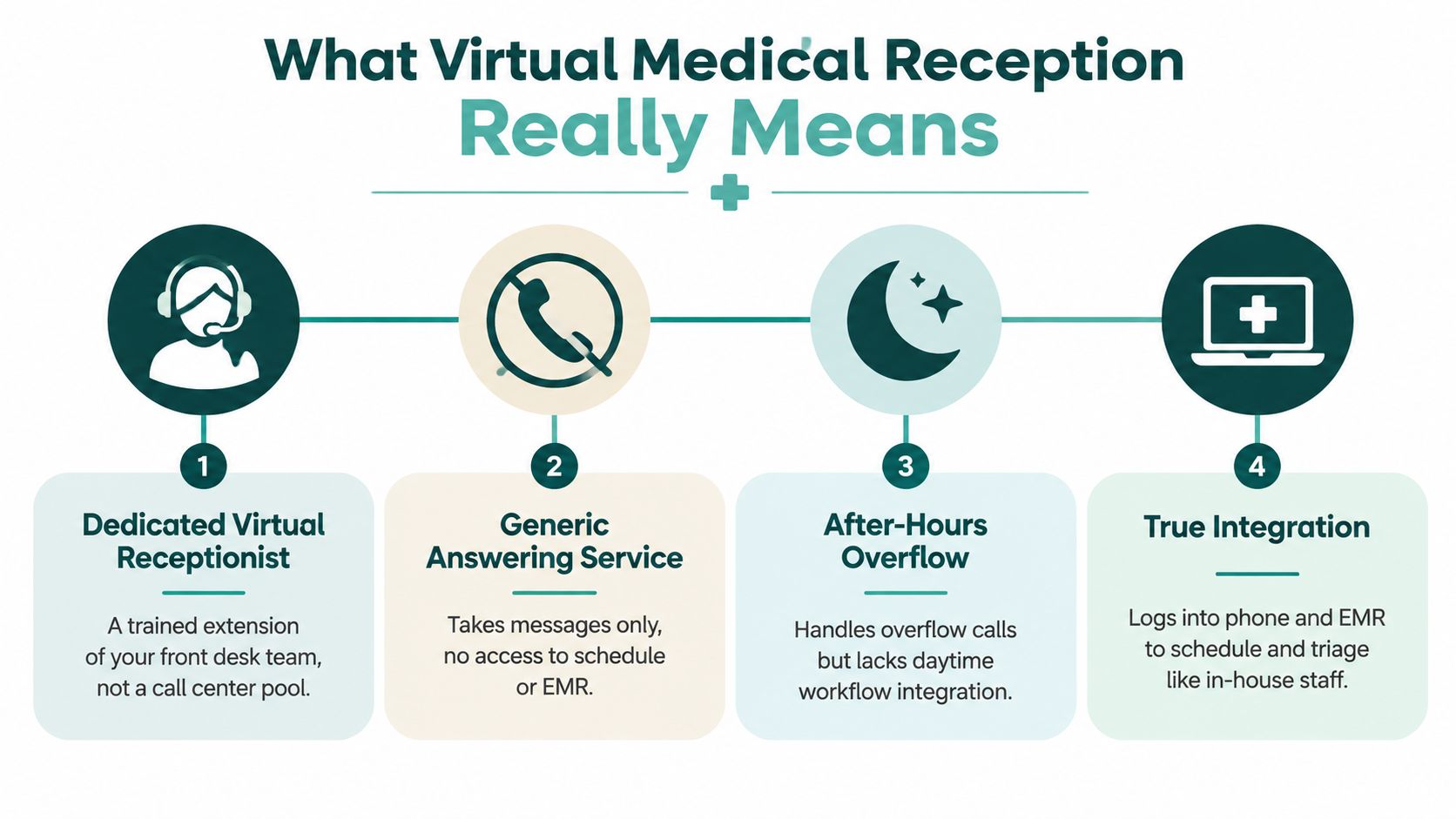
A virtual medical receptionist is not just a message taker with a headset and a nicer logo. It's a remote front-desk operator who works inside your systems, follows your scripts, and handles the parts of reception that move the schedule. That means inbound and outbound calls, appointment booking, confirmations, recall work, routing messages, and basic patient follow-up.
A generic answering service is the old-school version of this category. It takes a message, maybe transfers a call, and then sends the problem back to your team. Useful? Sure. Complete? Not even close.
The three versions people confuse
A clinic can buy one of three things and call all of them “virtual reception,” which is how this market gets messy fast.
- Dedicated virtual receptionist: a trained extension of your front desk team, working your workflows and your hours.
- Generic answering service: message capture only, with little or no system access.
- After-hours overflow: a partial safety net for evenings and weekends, not a real daytime front desk replacement.
The useful mental model is simple. If the person answering can't schedule, confirm, reschedule, or log into the tools your staff already use, then you've bought a voicemail filter with better manners.
What it should actually do
A real setup handles routine admin and escalates anything clinical. It should know when to book, when to route, and when to stop pretending it's a nurse. That boundary matters, because administrative work can be standardized while clinical judgment can't.
The best version feels boring in the right way. Calls get answered. Notes show up where they belong. Staff stop redoing work that was already captured on the first touch. That's the point.
If you want a simple analogy, think of it as a remote receptionist who has the keys to your calendar, not a stranger standing outside the building scribbling names on a napkin.
How Phone and EMR Integration Works in Practice
The magic isn't “AI” or “remote.” The magic is system access. If your virtual receptionist can't see the calendar and write into the EMR, you're just paying somebody to create more work for Monday morning.
The workflow that actually matters
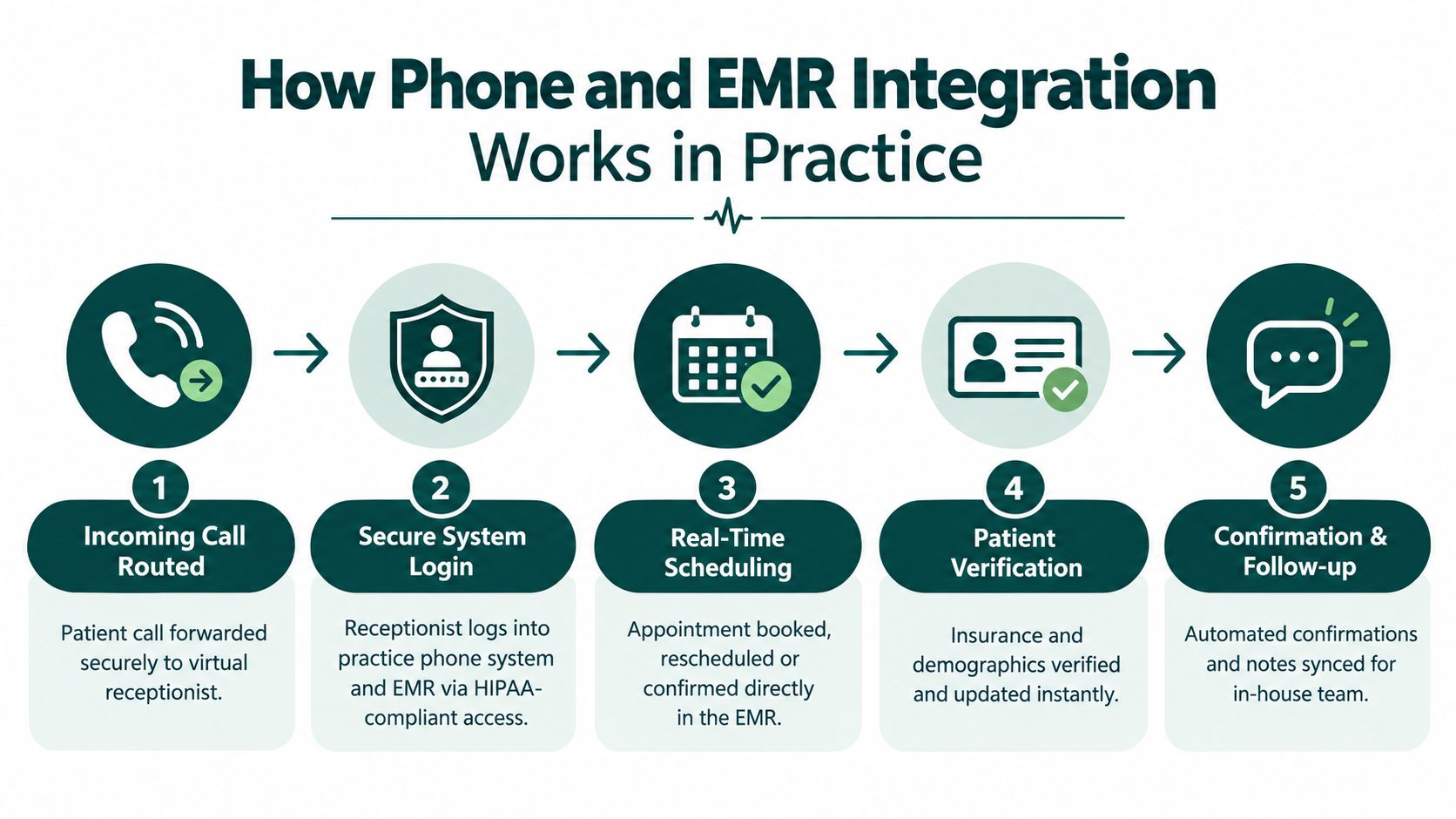
A proper setup starts when your practice forwards calls to the virtual receptionist. From there, the receptionist logs into the phone system and EMR with permission that matches the task, then works the request in real time. Appointments get booked, moved, or confirmed inside the schedule, not copied into a sticky-note graveyard.
Patient verification happens in the same flow. Demographics get checked, insurance details get updated, and the handoff lands in the chart while the caller is still on the line. That's the difference between embedded staffing and disconnected call center theater.
What a good handoff looks like
A clean handoff should answer three questions before your staff ever touches the request:
- Who called?
- What do they need?
- What already happened?
If the virtual receptionist captures the call, books the visit, and leaves a clear note, your team is starting from context instead of from zero. That's the whole game.
A bad handoff creates a second task for your staff. A good handoff deletes one.
Bilingual coverage fits naturally here, too. In a real clinic, language access isn't a bonus feature, it's basic operations. The point is to let patients speak in the language they're most comfortable with while the front desk still gets structured, usable data on the back end.
The compliance piece is not optional, and it's not sexy. If the person or platform touches patient information, the arrangement needs the right safeguards. HHS says a business associate agreement is required when a covered entity uses a business associate, and that written contract has to define permitted PHI uses and disclosures, require safeguards, require breach reporting, ensure subcontractors follow the same restrictions, and allow termination for material violations (HHS BAA provisions). If a vendor gets vague on that point, keep walking.
For a deeper compliance checklist, see this practical HIPAA guide for medical practices.
Why Clinic Hours Coverage Beats After Hours Only
Most patient calls do not show up as a midnight emergency. They show up while your staff is already busy running the clinic. That matters, because scheduling drives a big share of call traffic, while after-hours calls are the smaller slice. patient call patterns analysis shows the point clearly: the pressure sits inside business hours.
So why do so many practices buy after-hours-only coverage and call it a plan? Because it sounds neat. It leaves money on the table.
The day shift is where the money is
Clinic-hours reception catches patients when they are trying to book, reschedule, confirm, or ask a question before they give up and move on. That is where missed calls become abandoned calls, and abandoned calls become empty slots. If your front desk is thin during the day, you are protecting the quietest part of the schedule and exposing the busiest one.
Cover your own time zone first. That is the practical move. You do not need a night-only answering setup if the bottleneck hits at 10:15 a.m. on Tuesday.
What full-day coverage should look like
Full coverage does not mean someone answers only some of the time. It means calls get handled consistently while patients expect the office to be live. That includes new bookings, same-day reschedules, referral questions, reminder calls, and message triage during clinic hours.
A strong setup also keeps the desk from turning into a callback factory. Every unanswered call creates another task, and every task creates another chance for the patient to drift away. That is not theory. That is friction doing its job.
| Where Patient Calls Actually Happen | Share of Volume | Implication for Reception Coverage |
|---|---|---|
| Appointment scheduling | 25.7% | Needs live coverage during clinic hours |
| After-hours calls | 9.5% | Helpful as backup, not the main event |
| Midnight to 5 a.m. | 0.5% | Rare edge case, not the core staffing problem |
The blunt recommendation is simple. Start with clinic-hours coverage in your own time zone, then add after-hours support if your call logs justify it. Otherwise you are paying for the quiet part of the week while the loud part keeps winning.
Human AI and Hybrid Reception Compared Without the Hype
A front desk does not fail in theory. It fails on the ugly calls. The patient is upset, the instructions are unclear, or the request sits halfway between scheduling and triage. That is where the model matters.
Human reception still wins where nuance matters
Live staff handle messy conversations better. They hear the panic, ask the follow-up, move the visit, and keep the patient on the line. That matters because live outreach pays off. In a randomized study of 13,505 appointments, clinic staff calls three days before the visit produced a 13.6% no-show rate, versus 17.3% with automated reminders and 23.1% with no reminder (randomized outpatient study00108-7/fulltext)). A receptionist who solves the problem during the call is doing revenue work, not admin theater.
AI is fast, but fast is not the same as complete
AI answering is strong on repetitive calls and predictable workflows. It picks up instantly, routes cleanly, and skips hold music. Good. Useful. Still limited.
The trouble starts when the call gets messy or touches anything that feels even slightly clinical. Then the bot sounds confident and wrong, which is a terrible combination. Trust, disclosure, and logging matter more as virtual reception moves closer to triage-like work, especially in multilingual or AI-assisted setups. The technology can do more. That does not mean every task should be handed over.
Hybrid is usually the grown-up choice
Hybrid setups make the most business sense. AI handles routine FAQs, overflow, and after-hours capture. Humans handle live scheduling, sensitive calls, and anything that needs judgment. That split keeps the machine on the boring work and puts staff on the calls that require a pulse.
My bias: if your phones are messy and your patients are real humans, hybrid beats pure automation more often than the vendor deck admits.
For practices that want the human side of that mix, one option is Medical Virtual Assistants. It places live assistants on US clinic hours inside the practice's EMR and phone systems. That is not magic. It is staffing. And if the problem is call abandonment, schedule leakage, and missed revenue during the day, staffed coverage beats a generic after-hours line every time.
Operational Benefits You Can Measure From Fewer No Shows to Faster Schedules
A good virtual reception setup disappears into the workflow. Calls get handled. Charts get updated. The schedule stops leaking like a cracked bucket. That is the whole point.
Live follow-up beats generic nudges
Reminder mechanics matter, but they do not do the whole job. In a pragmatic randomized study of primary care visits, one additional text message reduced no-shows from 9.1% to 8.4% and same-day cancellations from 6% to 5.6% (primary care text reminder study). In mental health visits, an extra text cut no-shows from 11.1% to 9.9%. Useful. Not enough on its own.
Reception has to do more than send reminders. It should confirm visits, reschedule open spots, and fill cancellations before a chair sits empty. One-way reminders are fine. Two-way recovery is better. Pair confirmations with upstream eligibility checks described in how to verify insurance before the visit, and you cut down on avoidable churn before the day even starts.
What improves when reception works
A working setup shows up in the numbers and in the mood at the front desk:
- Fewer voicemail queues: calls are handled before they stack up.
- Cleaner schedule utilization: empty slots get refilled faster.
- Less staff rework: notes land in the system the first time.
- Better patient retention: callers who get through are less likely to vanish.
- Quicker message triage: urgent items stop hiding in a pile of routine noise.
The live-staff piece matters most during clinic hours. A receptionist who can confirm, reschedule, and handle exceptions in real time protects revenue and keeps patients from drifting to the next open appointment. After-hours answering alone does not do that. It catches messages. It does not save today's schedule.
Do the math on your own calls. A smooth calendar is usually just a calendar where someone answered early enough to save it.
The point is simple. Make the work visible, routable, and recoverable before the patient moves on.
Choosing and Launching Your Virtual Reception Setup
A bad rollout starts with the wrong question. Practices ask whether to buy AI. The better question is blunt: where are calls dropping, where are patients waiting too long, and where is the schedule leaking revenue? If you cannot answer that, you are shopping by instinct, and instinct does not fill chairs.
Start with the unglamorous checks. They save headaches later.
- HIPAA and BAA: get the agreement signed before any patient information moves.
- EHR and phone compatibility: confirm the system writes into the tools your team already uses.
- Specialty fit: primary care, dental, and mental health do not run the same way.
- Coverage hours: choose clinic-hours staffing, after-hours backup, or both.
- Pricing clarity: know what is included, what costs extra, and who owns the cleanup if the workflow changes.
For role scope, costs and hiring steps, see what a medical virtual assistant does, costs and how to hire.
I trust a five-stage screening process: background check, role-specific skills testing, spoken and written English assessment, HIPAA training before start with annual refreshers, and a final placement interview. That is not fancy. It is basic control.
Onboarding should feel controlled, not heroic
Start with role scoping, not a live fire drill. The vendor or staffing partner should shape the workflow around your specialty, software stack, and hours. Then ask for a human-curated shortlist, candidate interviews, and re-matching support if the fit is wrong.
That last part matters. A front desk role is too visible for guesswork. If the person or platform cannot handle your actual call mix, you need a clean exit and a better match, not a month of polite frustration.
The practical move is clear. Put clinic-hours human coverage first. It catches calls while patients are actively booking, rescheduling, and deciding whether to stay with your practice. Generic after-hours answering does less. It takes messages. It does not recover today's schedule.
Use automation where it removes repetition. Keep humans where judgment, tone, and speed protect revenue and retention. That is the setup worth running.